Showing posts with label - Aye-Aye. Show all posts

6.12.12

Aye-Aye Model Sheets

Here are the Model sheets and some poses for my cartoon "An Eye for an Aye-Aye".
These designs were created in 2007 for my Student film.

Model Sheets
Pose Chart


2.11.12

Untooning and Smudgey Brushes

I've been playing around with the Smudge Brushes in Photoshop recently.
Smudging Pixels around can be strangely rewarding. No wonder so many of you do it!

Ok, these aren't your typical Untooned drawings where actual Textures from Photographs may be used. But they're a step in the right direction.
Self Portrait Untooned
The Aye-Aye Untooned

Keep Smiling.

Bonus Feature:
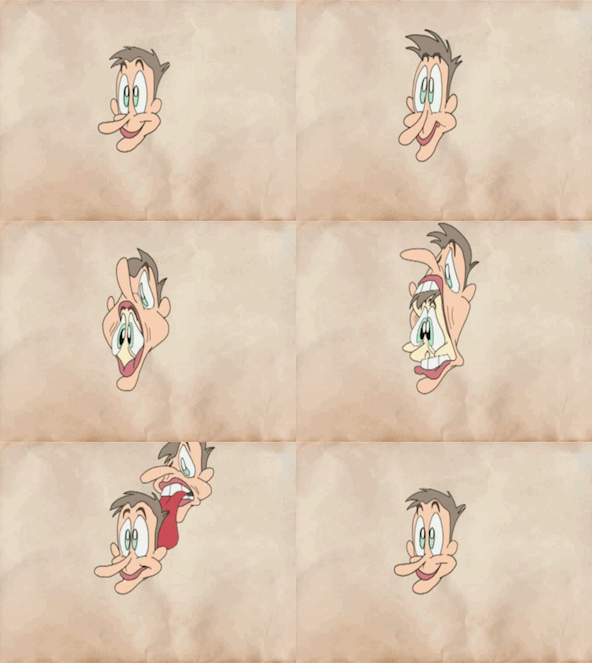
Here's 'Regurgitate' in a fun little Animated GIF format.

9.5.11

Lip Sync in Progress

Hey,

This past weekend I dug out a scene from 'Aye-Aye' that was only partially animated on paper. Also, after a long absence from Flash, I'm giving it a go again.  Putting those things together I bring you a Lip Sync, Clean Up Linetest.

 For those wondering, "An Eye for an Aye-Aye" is a cartoon short that I work on every now and then. You can follow the development of the short by clicking the label - Aye-Aye.


What is he saying? Well, that will have to wait for another time.
Click the Pic for Biggies... But not too Big. 

Cheers.

25.7.10

"An Eye for an Aye-Aye" July Preview 2010


Here is a preview segment from my short cartoon. It's most of a sequence, there are a couple of shot's which I haven't Cleaned Up yet and so they weren't included. I won't be putting up a lot of video's from "Aye-Aye" anymore, not until the cartoon is finished anyway. I will be uploading video's from other animations I work on though.

This is just a short sequence from my cartoon. I'm quite deep into this now and I would really appreciate any feedback you could give me. Be it on Style, character design, animation timing, anything really. I just need to know that people are actually going to want to watch my cartoon when it's finished. Please leave a comment here or on the video page and share this preview with your friends too. All help is welcome.


Show notes and technical bits:
3 of the shots in the segment were made in 2007 while the 4 other shots were all made 2010.
The way each of the shots was put together varies greatly.

In 2007 I was in my final year at Freelance Animation School. Those shots were Cleaned Up traditionally with pencil and paper, then Scanned one frame at a time. The animation frames were coloured in Toonboom and the backgrounds were coloured in Photoshop. Toonboom would trace over my Clean Up drawings and Vector them. 

The quality of the vector depended on my pencil clean up along with the size and quality of the original drawings. Doing it this way, any dirt or registration marks left on the paper during scanning would need to be erased later in Toonboom. It wasn't always possible to find all the bits of dirt on the frames.


 From 2008 onwards I have been working with some Open Source software to achieve the same results as with Toonboom and Photoshop. These days my animation shot pipeline goes a little something like this...
  • Traditional Hand Drawn animation - Pencil and Paper on an animation desk.
  • Line test the animation using a webcam mounted to an old photographic enlarger - See Here
  • If I'm happy with the timing of the shot then I start Digitally cleaning up the captured frames. I do my clean up in a program called 'Pencil'. Digital CU can take the same amount of time as Traditional CU.
  • Although pencil has colouring capabilities, I like to do all my colouring and background art in Gimp.
  • Then when the shot is cleaned up and coloured I use a program called Wax for the compositing.
  • Audio is done with Audacity and then my final edit is made in Pinnacle Studio 12 (which isn't Open Source).
I will go into these steps in more detail one day but that probably won't be until things wrap on "Aye-aye".

 Cheers.

13.7.10

'Aye-Aye update' - Style Guides / Cintiq 12WX

Hey guys,

Today I have the style guides for the two characters in my short cartoon. That pesky Aye-Aye and Tim Portans. I had posted the Tim Portans style guide in the last 'Aye-Aye update' which you can check out here. All of the character frames used here are actual frames from the animation.
For any new readers passing by, I'm independently working on finishing my short cartoon "An Eye for an Aye-Aye", A cartoon which started out as my student film in 2007. I work on it in my spare time and the majority of the software I use for clean up and Ink & Paint are Open Source or Freeware.


You can track my progress on the project here. I'm hoping to have it finished and online by the end of the year but it's still too early to confirm that as I have other animation projects and work commitments happening as well.

This week I bought a Wacom Cintiq 12WX and I am very impressed with it. Since my last tablet was a $75 model, the jump to Wacom has been pretty amazing. I've only had it for a few days so I haven't properly put the Cintiq through its paces yet but it has already sped up Digital Clean-Up.

If you have been following my posts on Twitter and Facebook I mentioned that I had to slightly rearrange my room to find a better place to put the Cintiq without packing away my animation desk, which I still plan to animate on. This is good as I bought the Cintiq to speed up my current animation methods instead of entirely replace the old methods.
Thank you to all who have checked out my updated Showreel online, it's had over 100 views now and every view counts. I plan to upload updated Showreel's every 6 months or so, look out for the next one at the end of the year.

In one of my next posts I'll upload an edited sequence from "Aye-Aye".

Cheers.

30.6.10

Showreel June 2010


Here is my updated Showreel of traditional hand drawn animation. It includes full colour shots and rough pencil tests.

Music: 'Sweet Georgia Brown' by Latché Swing.
All the content in this video is hand drawn, with paper and pencil (the traditional way) and then Cleaned Up, Coloured in the computer and composited together into a final shot. This was all done by me and mostly with Open Source software.


Here is a list of clips I have used:
  • Several colour shots from "An Eye for an Aye-Aye" bookend the Showreel. This includes 2 shots where we hear my character, Tim Portans speak for the first time.
  • The Superhero segments are animation made for background use in the short film 'Michael John Shadbolt'
  • The Line (pencil) tests include a clip from "An Eye for an Aye-Aye" and 2 early animation clips I made at Freelance Animation School.
  • All 4 of the 'One Shots' to date are also include throughout the video.

Let me know what you liked or disliked or maybe tell me about something you want to see more of.
Cheers.

21.5.10

Preview Clip


Here is a shot from my short cartoon "An Eye for an Aye-Aye". You can see the original pencil test, followed by the final composite. This was a slightly more complicated shot to put together as I ended up with the following layers:
  1. Tim Portans
  2. The Branch
  3. Gun Smoke 
  4. Prop Shotgun (briefly)
  5. Background
I'm very happy with the way it's turned out.

This was created mostly with open source software, The sound effects are from http://www.freesound.org

Thank you to gcmax, nthompson and Alienxxx for the sounds.

20.5.10

Digital Layout


Here's a scene layout with digitally cleaned up elements. I didn't actually export a line test with the clean ups, I might have to try that with the next couple of scenes I work on.  Anyway the colouring for this shot is complete, I'm just putting the sound together and I'll be posting it online once that's done. Next month I might edit a sequence together to get some feedback on how things are coming along, as I'm not always working through the shots in sequential order so this hasn't been possible yet.

Check back soon to see a finished shot or subscribe to one of my video accounts to be notified when it's uploaded.

Thanks guys.

17.5.10

'Aye-Aye update' - Model Guide - Tim Portans

Hi folks,

Here is a style guide for the main character from my short cartoon. You can read more about him here and find images of him and the Aye-Aye scattered in previous posts. The shots above are all cels from the cartoon, digital cels.


I'm going for a retro cartoony style in a classic 'man vs animal' scenario. Don't worry, the shot gun will play a very minor part in the cartoon and I won't over use the pop out eye gags.

The Update: I have completed a couple more shots but I'm still not sure when it will all be said and done as one of the harder parts is yet to come (reanimating old and incomplete scenes which don't fit in anymore).  At the moment, the plan is to drop one of the shots (which is basically filler anyway) and hopefully make an intro for the beginning.

In other news, I'm going to be doing a write up on my animation pipeline in its basic form. I've already outlined this, just haven't gotten around to writing it. As for the next video, I'll either wait until I have enough shots to make a 30 second trailer or I'll post a mid year Showreel. I'm not sure yet.
Thanks for all the support recently (especially from friends and family), it's much appreciated. Remember to check my facebook page and recommend it to anyone who might be interested.
I have also posted this image at The Big Idea. Have a look at some of my other posts by clicking on my Big Idea Profile.


Cheers.

4.4.10

"Tend to my Creations"


Ah It's so good to finally have a weekend where I can just tend to my creations, if only ever so slightly.

I've had time to sketch up some designs for a new character today and over this Easter weekend I have been Cleaning Up some more of my short film. Above is a Clean Up colour render and the original pencil sketch which it was Cleaned Up from. This is just a quick render though, the colours and background will be different in the final form.


Happy Easter!

2.2.10

Tim Portans - A bit more about him & his mouth.


Welcome regular readers and those of you just passing through.

Today I give you an image showing some of the mouth shapes used in a speaking scene from my cartoon. I think it's been a while since I've had a post about Tim Portans, he's the main character which the storys point of view is mainly told from. He's a pilot who is stuck in a tree (a very tall Baobab tree mind you) and soon comes face to face with that pesky critter, The Aye-Aye.

 Tim Portans was designed and refined in 2007, He had some major facial reconstruction (a last minute Chin Change) before a "final" design was settled upon. I say "final" because I'm trying to keep his model fairly loose. You can see some of his earlier designs and model sheets in two of my early posts from 2007, Here and Here. 

I just want to mention somebody who has played a huge part in creating Tim Portans as a character. He is Joe Poole, one of the third year tutors I had at Freelance Animation School. Joe really helped work my concepts into the final model designs and then provided a voice which ultimately became the voice for Tim Portans. These are some of the things which cemented the character into place in my mind at a time when I didn't quite know what he was going to sound like. Unfortunately I won't be sharing the voice of Tim Portans anytime soon, that will have to wait until the project is near its completion.


Feel  free to visit my Profile on The Big Idea, a great New Zealand site for the creative industry where I have found work before. Also if you have any questions or enquiries for me, leave a message or post a comment. I will get back to you as soon as possible. 


Cheers Folks.

23.1.10

"An Eye for an Aye-Aye" Shot Progression


The cartoon I am making is called "An Eye for an Aye-Aye", I started it a few years back when I was studying animation. Recently I have started working on it again in my spare time and using as much freeware as I can to get it completed.

This sequence shows the development of one shot from the cartoon. It has an early pencil test, a more detailed pencil test, the digitally cleaned up line, the digitally coloured cel and the final composite. The linetests are actually from late 2007, whereas the clean up and colouring is from up to a few days ago. I hope you will excuse the lineboil and other little nitpicks and enjoy this little sequence.

This was cleaned up with a program called Pencil, All the colouring was done in GIMP and composited in WAX.


Thanks for dropping by.

29.4.09

'An Eye for an Aye-Aye' 3d Test shot

'An Eye for an Aye-Aye' 3d test shot from Jeff Cook on Vimeo.

Just a test of a 2d animated scene converted into anaglyph 3d. It is slightly enhanced if you wear 3D anaglyph glasses but at the same time it's not too hard on the eyes without glasses at this resolution.

Background elements were made in The Gimp, camera moves were done in Wax. I use Faststone Photo Resizer for all my batch needs, in this case it was to get the colour values correct. Then I put the image sequences back into Wax (which thankfully has a layer multiply tool) and slightly offset them until I saw some 3d.

This IS a scene from the opening of my student film. It's the establishing shot of the location and my main man, Tim Portans.

Guess I should stop playing around now...

24.4.09

Side by Side shot comparison


Yay! Double post day!!
Why not?

Here is a comparison shot between a rough animation pencil test and the final coloured composite.

The pencil animation was filmed on a webcam and captured in Monkey Jam (and had some compression issues), traced digitally in vector program Pencil and coloured in Inkscape. The Background was created in The Gimp and everything was composited together in Wax.
If that all sounds like gibberish then maybe you would like to know that those are all Open Source freeware software.

This is a shot of self proclaimed "Flying Ace!" Tim Portans in search of that pesky and elusive Aye-Aye.

Enjoy...

Development from Concept to Final Composite


The concept art was done in February 2007 and the rough animation was done late May in 2007. But coloured composite was just done last week.

While I was looking through some concept art I found this piece, which was an early piece that was used in my (first?...) project pitch to the tutors. Unlike other concept art in my pitch, this actually became a scene.

My character Tim Portans' outfit was almost refined enough for the model pack but his face, particularly his chin and hair style, still had a lot of tinkering to go.

Also the background design for this shot only changed slightly from concept through animation.

Cheers.